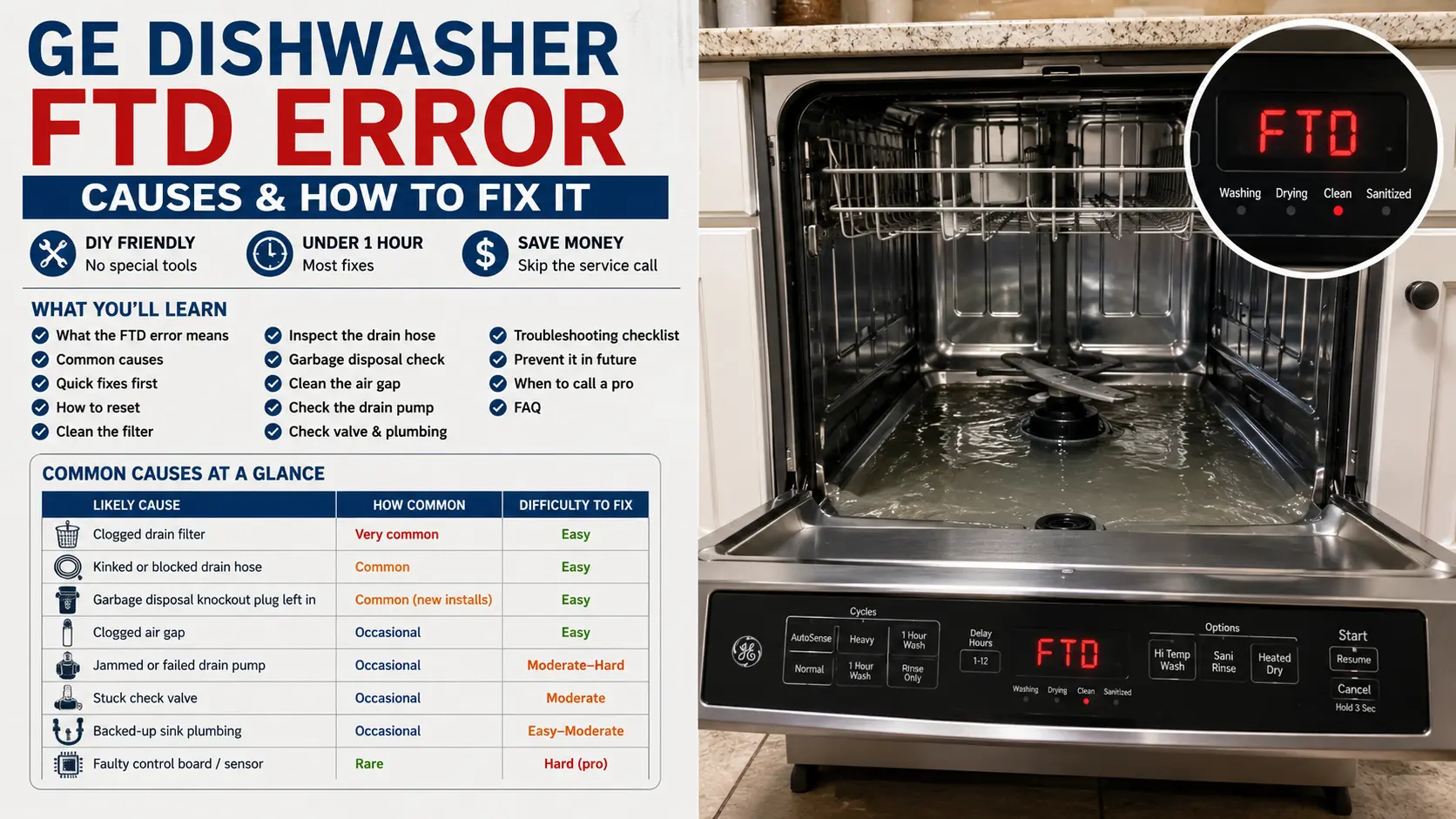
Few things kill the mood in a clean kitchen faster than opening your dishwasher and finding a pool of dirty water at the bottom — with an FTD error staring back at you. If your GE dishwasher just threw this code, take a breath. In most cases you can fix it yourself in under an hour, with no special tools.
This guide explains exactly what the FTD error means, why it shows up, and how to clear it step by step. I'll keep things simple and skip the jargon. By the end, you'll know how to get your dishwasher draining again — and how to stop the problem from coming back.
What Does the GE Dishwasher FTD Error Mean?
FTD stands for "Failure To Drain." In plain English, your GE dishwasher tried to pump the water out at the end of a cycle, but the water didn't go anywhere. The machine noticed the leftover water and flagged the problem with this code so you'd know something needs attention.
Think of it like your dishwasher raising its hand and saying, "Hey, I did my job, but the water is still here." The dishwasher washed your dishes just fine. The trouble starts when it tries to send the dirty water out through the drain system and hits a roadblock somewhere along the way.
You'll usually spot the FTD error in one of two ways. Either the display shows the code directly, or you notice flashing lights and a cycle that won't finish. On many models, you'll also see standing water in the bottom of the tub — the classic sign of a drainage problem. The good news? FTD almost always points to a blockage or a simple mechanical hiccup, not a dead dishwasher.
Why Your GE Dishwasher Shows the FTD Error
The water in your dishwasher follows a path: it leaves the tub, travels through the drain pump, runs through a hose, and finally empties into your sink drain or garbage disposal. If anything blocks that path, the water backs up and your GE dishwasher throws the FTD error. Here are the most common culprits at a glance:
| Likely cause | How common | Difficulty to fix |
|---|---|---|
| Clogged drain filter | Very common | Easy |
| Kinked or blocked drain hose | Common | Easy |
| Garbage disposal knockout plug left in | Common (new installs) | Easy |
| Clogged air gap | Occasional | Easy |
| Jammed or failed drain pump | Occasional | Moderate–Hard |
| Stuck check valve | Occasional | Moderate |
| Backed-up sink plumbing | Occasional | Easy–Moderate |
| Faulty control board / sensor | Rare | Hard (pro) |
Notice a pattern? Most of these are clogs and blockages — stuff you can clear with your own two hands. Let's tackle them one at a time, starting with the quickest wins.
Quick Fixes to Try First
Sometimes the FTD error is a fluke. A single cycle got interrupted, or a small bit of debris caused a temporary backup. Before you dig deep, try these fast moves:
First, cancel the current cycle and let the dishwasher sit for a minute. Many GE models have a "Cancel" or "Start/Reset" button — press and hold it, then wait for the machine to drain on its own. You might hear the pump kick in and clear the water.
Next, scoop out the standing water. Grab a cup and a towel and remove as much as you can from the bottom of the tub. This gives you a clear view of the filter area and makes the rest of the job far less messy. Then run a short rinse cycle to see if the water drains now. If it does, the blockage may have cleared itself. If not, move on to a full reset.
How to Reset Your GE Dishwasher
A reset clears the dishwasher's memory and gives the control board a fresh start. It's the digital equivalent of "turn it off and on again," and it works more often than you'd think.
- Cut the power. Unplug the dishwasher, or switch off its circuit breaker.
- Wait five minutes. This lets the control board fully power down and release any stuck error.
- Restore the power. Plug it back in or flip the breaker on.
- Start a fresh cycle. Choose a normal wash and watch whether it drains at the end.
If the FTD error clears and your dishwasher drains fine, you're done. But if the code comes back, the reset only treated the symptom — you've got a real blockage to find, so let's keep going.
Check the Drain Filter First
The filter sits at the bottom of your dishwasher tub, and it's the number one cause of drainage problems. Over time, food particles, grease, and gunk pack into it and choke off the water flow. Clean it, and you'll fix the FTD error more often than not.
Pull out the bottom dish rack so you can reach the floor of the tub. Look for a round filter assembly, usually near the back center or under the spray arm. On most GE models, you twist the top filter counterclockwise to unlock it, then lift it straight out. A second, flatter filter often sits underneath — pull that out too.
Take both filter pieces to the sink and rinse them under warm running water. Use an old toothbrush to scrub away stubborn grease and stuck-on food. Hold the mesh up to the light — you should be able to see through it clearly when it's clean. While the filters are out, wipe any sludge from the empty housing and the small sump where water collects before it drains.
Pop the filters back in, lock the top one by twisting clockwise, and run a rinse cycle. A clean filter solves a huge share of GE dishwasher not draining complaints, so don't skip this step even if your filter "looks" fine.
Inspect the Drain Hose
If a clean filter didn't do the trick, the drain hose is your next suspect. This flexible hose carries water from the dishwasher to your sink drain or garbage disposal. When it kinks, twists, or clogs, the water has nowhere to go — and you get the FTD error.
Look under your sink and follow the hose from the dishwasher to its connection. Check for sharp bends or kinks, especially where the hose curves behind the cabinet. A kink acts like a pinched straw, and straightening it might be all you need. Next, disconnect the hose (keep a bucket and towels handy) and check for clogs — run water through it or push a flexible brush through to clear buildup.
Pay special attention to the high loop. The drain hose should rise up high under the counter before it drops down to the sink connection. This loop stops dirty sink water from flowing back into your dishwasher. If the hose sits low the whole way, water can siphon backward and trigger drainage issues. Secure the hose so it loops up near the top of the cabinet, then reconnect everything tightly and test a cycle.
The Garbage Disposal Connection
Did you just install a new disposal? New garbage disposals ship with a solid knockout plug sealing the dishwasher inlet. If nobody punched it out, your dishwasher water hits a dead end and backs up every single time — a classic cause of a sudden FTD error.
If your GE dishwasher drains into a garbage disposal, look under the sink and find where the dishwasher hose meets the disposal. Disconnect it and shine a flashlight into the inlet. If you see a solid plastic wall instead of an open hole, the knockout plug is still in place.
To remove it, place a screwdriver tip against the center of the plug and tap it firmly with a hammer until it pops loose inside the disposal. Then remove the plastic piece by hand (with the power off, always), reconnect the hose, and test. Even on an older disposal, food and grease can clog the inlet over time — so run the disposal with plenty of water to clear it, then check if the dishwasher drains again.
Check the Air Gap
Some kitchens have an air gap — a small cylindrical fixture that sticks up from the countertop or sink, usually next to the faucet. It stops dirty water from siphoning back into your clean dishwasher, but it clogs just like everything else.
Twist off the cap, lift out the inner cover, and look inside for food debris, grease, or mineral buildup. Clean it with a brush and warm water, then run the faucet to flush it. If your dishwasher water bubbles up out of the air gap during a cycle, that's a dead giveaway the air gap is clogged. Not every kitchen has one, so don't worry if you can't find it.
Look at the Drain Pump
If you've cleared the filter, hose, disposal, and air gap but the water still won't drain, the drain pump moves to the top of your list. This pump pushes water out of the dishwasher. When it jams or fails, the water just sits there.
First, listen during a cycle. A healthy pump makes a steady humming or whirring sound. If you hear a loud grinding noise, a faint buzzing with no water movement, or total silence when it should be draining, the pump is likely your problem. Pieces of broken glass, plastic, fruit pits, or even a small bone can jam the impeller.
To check it, cut the power, remove the filter, and look down into the sump. Some models let you see or reach the impeller from inside the tub. Carefully remove any debris with your fingers or pliers. If the impeller spins freely but the pump still won't run, the motor may have failed — and that's a bigger job, usually meaning you tip the dishwasher and work underneath. This is where many people decide to call a pro.
Check the Valve and Your Plumbing
The check valve is a small one-way gate in the drain path. It lets water flow out but stops it from flowing back in. When it gets stuck or clogged, it traps water in the tub. Find it near the drain pump or hose connection, clean out any debris, and gently work the little flapper to free it up.
And don't forget your plumbing. If your sink drains slowly or backs up, that same clog stops your dishwasher from draining too — they share the same pipes. Fill the sink with water and watch how fast it empties. If it crawls, clear that clog first with a plunger or drain snake. A lot of people tear apart the dishwasher when the real issue sits a few feet away in the sink trap, so always rule out the sink before you blame the machine.
Step-by-Step Troubleshooting Checklist
Work through this list in order, and test the dishwasher after each step. Stop as soon as the FTD error clears — nine times out of ten, you'll fix it in the first half.
| Step | Action | Why it helps |
|---|---|---|
| 1 | Cancel cycle & scoop out water | Clears the view and resets the cycle |
| 2 | Reset power for 5 minutes | Clears temporary glitches |
| 3 | Clean the drain filter | Fixes most FTD cases |
| 4 | Straighten & clear the drain hose | Restores water flow, sets the high loop |
| 5 | Check the garbage disposal plug | Removes a dead-end blockage |
| 6 | Clean the air gap | Clears countertop drainage path |
| 7 | Inspect the drain pump | Frees jammed impeller |
| 8 | Free the check valve | Stops trapped water |
| 9 | Test the sink drain | Rules out household plumbing clogs |
| 10 | Call a technician | For pump or control-board failures |
How to Prevent the FTD Error in the Future
Once you've fixed the problem, a few simple habits keep it from coming back:
- Scrape your dishes before loading. Knock the big chunks into the trash so less gunk reaches the filter.
- Clean the filter monthly. Two minutes prevents the slow buildup that causes most drainage problems.
- Run hot water before you start. The cycle begins with hot water, which dissolves grease better.
- Use the right amount of detergent. Too much soap leaves residue that gums up the system.
- Run a vinegar cleaning cycle monthly. A cup of white vinegar on the top rack clears grease and freshens the tub.
- Keep the garbage disposal clear. Run it with water before each wash to keep the drain path open.
When to Call a Professional
You can handle most FTD fixes yourself, but some situations call for an expert. Reach out to a technician if you've worked through the whole checklist and the error won't clear, if the drain pump needs replacing and you're not comfortable tipping the dishwasher, if you suspect a faulty control board, or if you see water leaking onto the floor. And if your dishwasher is still under warranty, let GE Appliances handle it so you don't void your coverage. Weigh the repair cost against a new machine, though — if yours is old and the repair runs high, a replacement might make more sense.
Frequently Asked Questions
What does FTD mean on a GE dishwasher?
FTD stands for "Failure To Drain." Your dishwasher tried to pump out the water but couldn't, usually because of a clog or a drainage blockage somewhere in the system.
Why is there standing water in the bottom of my GE dishwasher?
Standing water means the dirty water never left the tub. A clogged filter, a kinked drain hose, a blocked garbage disposal, or a jammed drain pump usually causes it. Start by cleaning the filter.
How do I reset my GE dishwasher to clear the FTD error?
Cut the power at the plug or breaker, wait five minutes, then restore power and run a fresh cycle. This clears temporary glitches, though a real clog will need hands-on cleaning.
Can a new garbage disposal cause the FTD error?
Absolutely. New disposals come with a knockout plug sealing the dishwasher inlet. If the installer didn't remove it, your dishwasher can't drain. Punch out the plug and reconnect the hose.
Will the FTD error damage my dishwasher?
Not by itself — it's a warning, not damage. But leaving standing water in the tub can lead to odors and mold, so fix it sooner rather than later.
How often should I clean my dishwasher filter?
Once a month works for most households. If you skip pre-scraping or run heavy loads often, clean it more frequently to keep the drain clear.
Final Thoughts
The GE dishwasher FTD error looks intimidating, but it almost always boils down to one thing: water that can't drain. And water that can't drain almost always means a clog you can clear yourself. Start with the filter, work through the drain hose, disposal, and pump, and you'll fix the vast majority of cases without spending a dime on repairs. Take your time, follow the checklist in order, and keep up with simple maintenance afterward — your dishes, and your kitchen, will thank you.